Men's Luxury Outfit Mood Board Prompt — Editorial Lookbook Breakdown
GPT Image 2 prompt example — copy the text below or click Try this prompt to generate on ImageGen 2.
GPT Image 2 Prompt
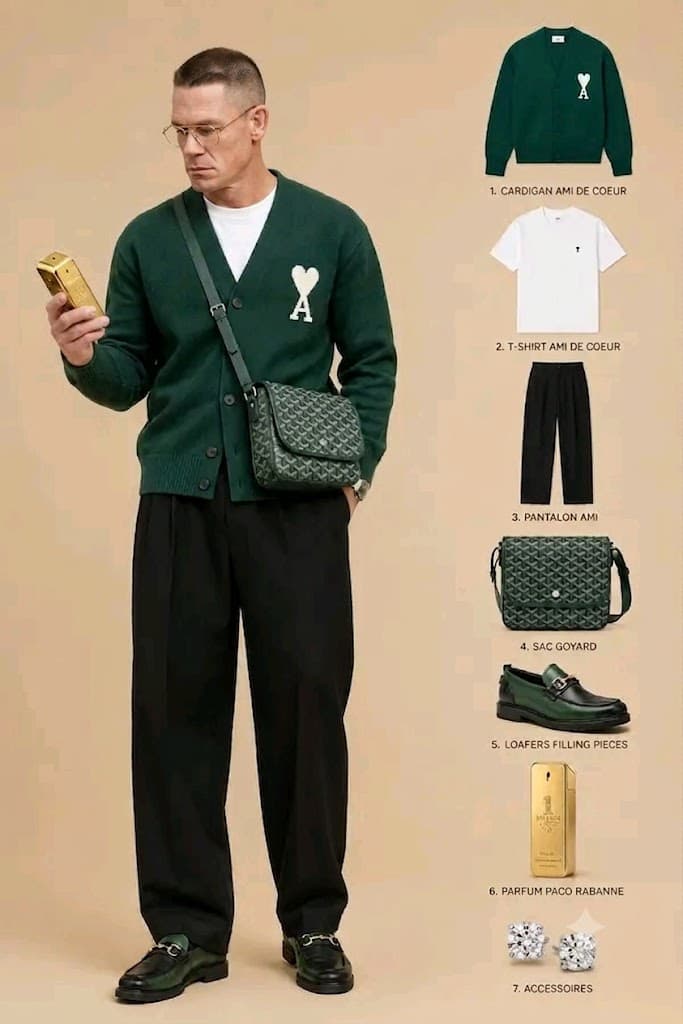
Create a premium men's fashion mood board on a clean, neutral beige background with a luxury editorial aesthetic. Place a full-body model on the left wearing a white crewneck T-shirt under a hunter green knit cardigan with a small heart logo, relaxed black pleated trousers, a green patterned leather crossbody bag, gold-rim rectangular glasses, a classic gold watch, and dark green-and-black horsebit loafers. The model looks down while holding a metallic gold bar-shaped perfume bottle. On the right, arrange clean cut-out product images vertically as a curated outfit breakdown with elegant numbered labels for each item: cardigan, T-shirt, trousers, crossbody bag, loafers, perfume, and accessories. Use soft studio lighting, realistic textures, balanced spacing, high-end magazine styling, luxury branding inspiration, and a polished, minimalist composition.
Pro Tips
Mood boards need explicit split layout ('full-body model left, vertical cut-out breakdown right') and a numbered item list — without both GPT Image 2 often renders only the styled model. Describe every garment and accessory before lighting so the right-side product strips match the worn look.